
You've seen the mess of badge formats at a trade show. QR codes printed on flimsy paper. Barcodes on plastic cards that have been through three shows already. NFC chips in wristbands at the tech-forward events. Handwritten name tags at the smaller regional ones. And business cards — always business cards — handed across the table.
If your lead capture tool only handles one of these, you're losing leads. And you won't know how many you missed — that's the part that should bother you.
Universal lead capture means one app scans everything, qualifies every lead the same way, and syncs to your CRM — no matter which event you're at or what badge format the organizer decided to use this year.
Here's how badge scanning and universal lead capture at trade shows actually works, what separates the two, and how to pick a tool that doesn't lock you into one event organizer's ecosystem.
How Trade Show Badge Scanning Works
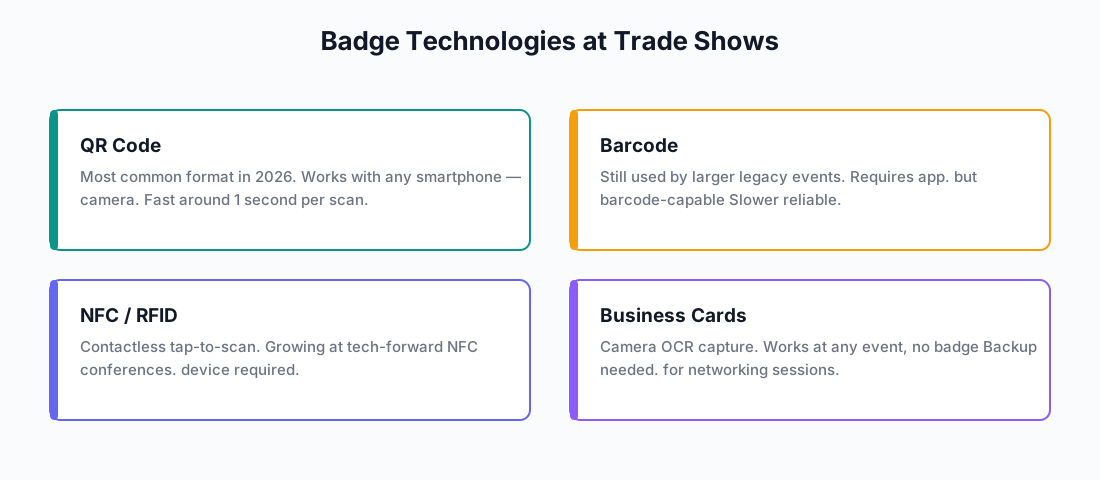
Four badge technologies dominate trade shows right now. You'll run into at least two of them at your next event.
QR Codes
This is what you'll see most in 2026. A printed QR code on the badge encodes the attendee's registration ID. Your app scans it, pulls their data from the event's database — name, company, title, email — and you've got the lead.
QR codes are fast. Any smartphone camera can handle them. The catch? They need a connection to the event database — or an app smart enough to cache attendee data before the show floor goes dark.
Barcodes
Larger events with older registration systems still use barcodes. Same idea as QR codes — a unique ID mapped to an attendee record — just a different visual format.
They work fine. They're familiar. But they're slower to scan and your app needs barcode support specifically. Not every scanning app handles both QR and barcodes well — check before you commit.
NFC / RFID
Some events embed NFC chips in badges. Attendees tap their badge on a reader or phone. It's contactless, fast, and feels polished — which is why tech conferences are adopting it.
But NFC isn't everywhere yet. You need hardware that supports it, and most events don't use it. Nice to have in your toolbox, not something to bet your whole lead capture strategy on.
Business Cards (and Handwritten Name Tags)
Smaller events and networking sessions don't bother with badge scanners. You get handed a business card — or a name tag someone scribbled on with a Sharpie — and you need to capture that data somehow.
Camera-based OCR handles this in most modern apps. Snap a photo, extract the fields, review for typos. It works at any event, badge or no badge. OCR isn't perfect — you'll want to spot-check — but it beats typing out email addresses one by one.
What "Universal" Lead Capture Actually Means
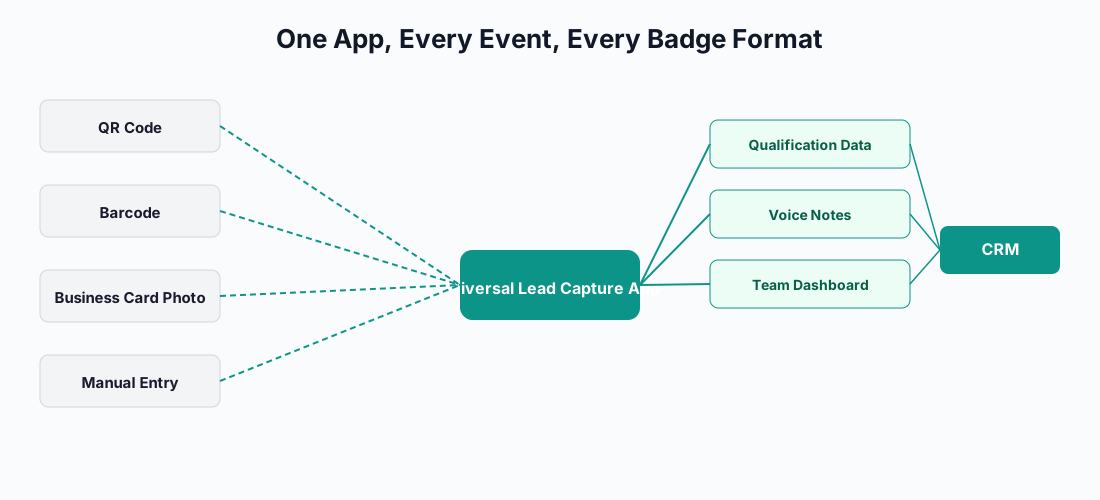
Captello coined the term. They used it to describe an app that works across every badge format, every event type, every organizer's platform. That's the bar. Here's what you're actually signing up for:
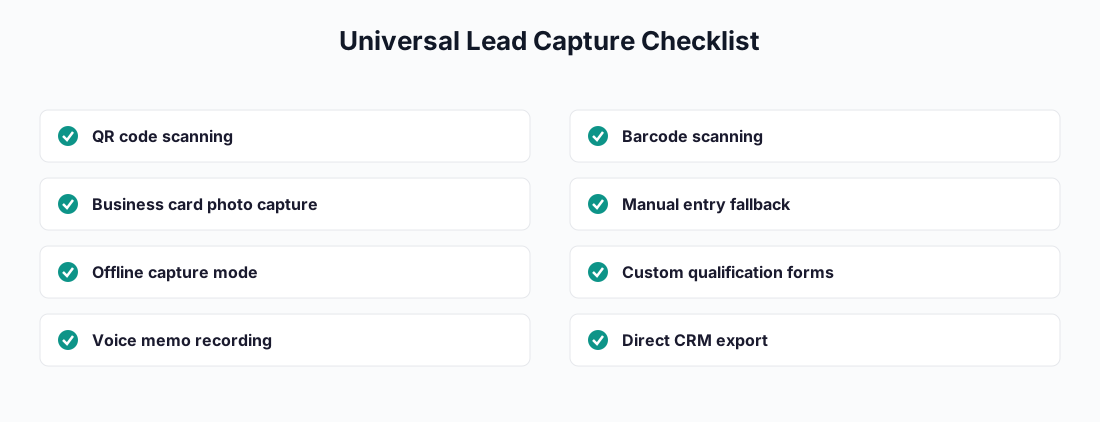
Your app handles every format. QR codes, barcodes, NFC, manual entry, business card photos — you're not switching tools mid-show because one attendee has a weird badge.
You don't need the organizer's permission. No proprietary hardware, no rented scanners, no asking permission to use your own software. Your app belongs to you.
Your setup follows you across events. Same qualification forms. Same CRM integration. Same team configuration. You don't rebuild everything every time you exhibit.
You've got a fallback when scanning breaks. Handwritten name tag? No badge at all? Networking drinks after the show? Your team still captures structured data without switching apps.
The "universal" part matters more than the "badge scanner" part. A tool that only scans badges leaves you empty-handed whenever scanning isn't an option — and that happens more than you'd think.
Offline Badge Scanning: Why It Matters
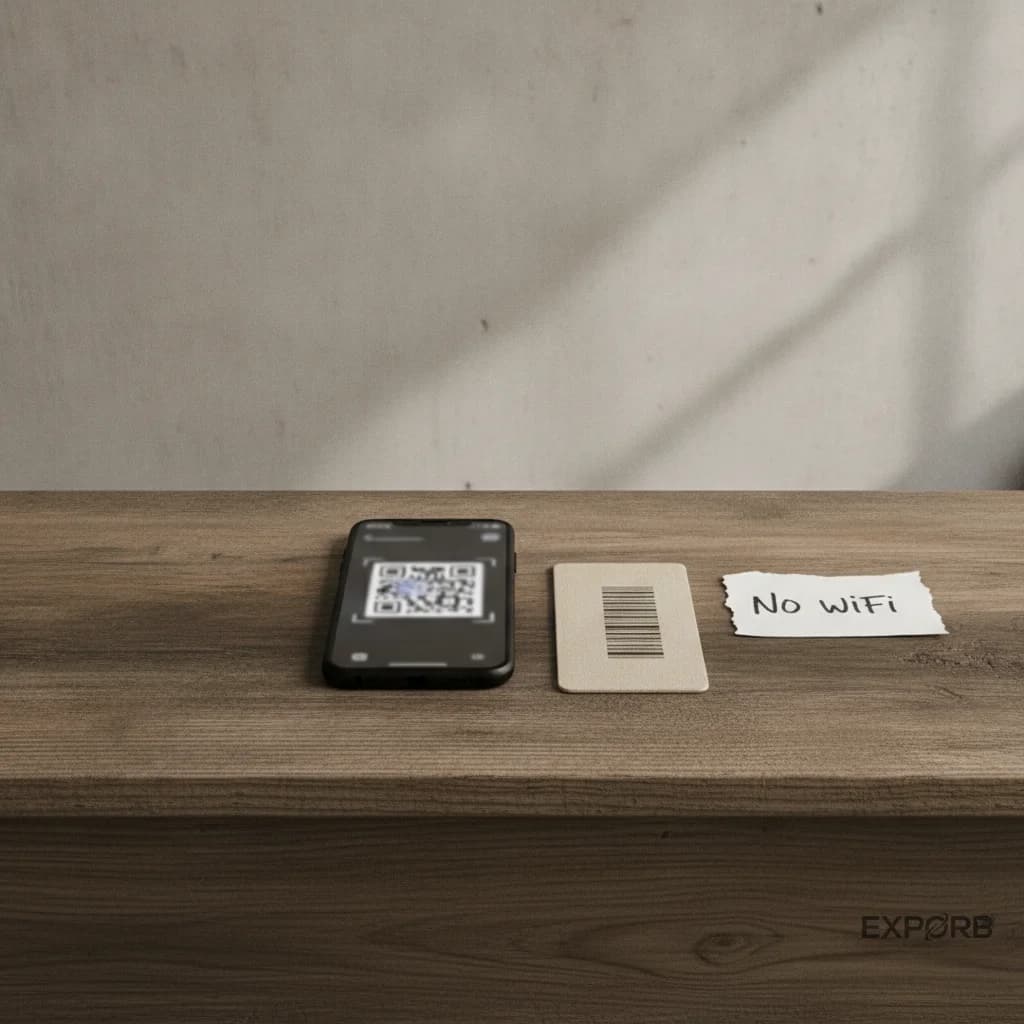
Convention center Wi-Fi is a joke. Basement exhibit halls, packed keynotes, outdoor booths at the far end of the venue — you'll lose connectivity at some point. Maybe for five minutes, maybe for the entire day.
If your app needs internet to look up attendee data, you're dead in the water. Leads walk past, you scan nothing, nobody knows it happened until you compare notes later.
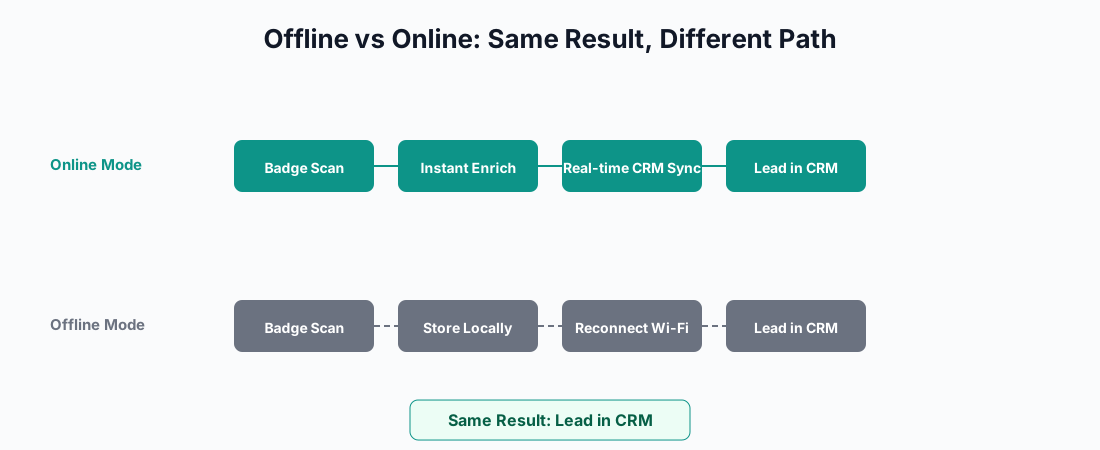
Offline scanning works two ways:
- Pre-cached attendee lists — your app downloads the event database ahead of time, matches badge IDs locally without touching the internet
- Capture-first, enrich-later — your app scans the badge ID raw, stores it, and fills in the attendee details when you reconnect
Zuant built its reputation on offline-first capture with video OCR for business cards. Exporb and Mobly both do full offline capture with background sync — scan the lead, fill out the qual form, record a voice memo, all stored locally, all pushed to your CRM when you're back online.
Here's a rule that'll save you: before every event, put your phone in airplane mode and test your app. If it can't capture a lead and store it without internet, don't bring it to the show.
Comparison: Badge Scanning vs. Business Card Scanning
| Badge Scanning | Business Card Scanning | |
|---|---|---|
| Data quality | Depends on registration data (often incomplete) | Depends on OCR accuracy (risk of typos) |
| Speed | 1–3 seconds per scan | 5–15 seconds with OCR |
| Requires badge? | Yes | No — works with any card |
| Offline | Requires cached attendee DB or capture-first approach | Fully offline (OCR on-device) |
| Enrichment | Limited to registration fields | Can extract phone, social profiles, custom fields |
| Best for | Large events with badge systems | Smaller events, networking, backup capture |
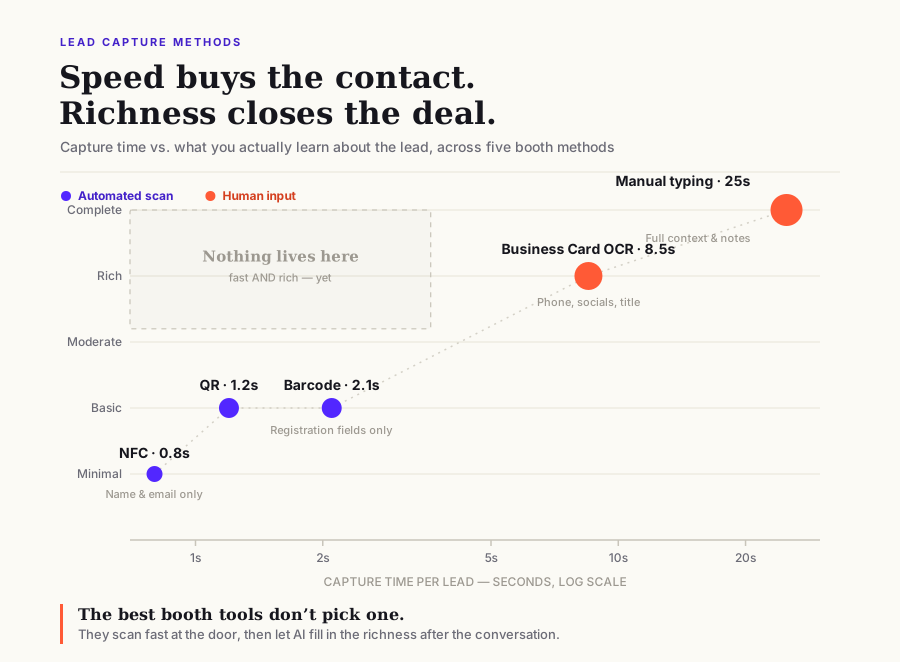
You don't have to pick one. The smartest tools do both — badge scanning for the high-volume rush at a busy booth, business card scanning as the backup when badges don't exist. You'd be surprised how much richer the contact details are from a photographed card versus what someone typed into a registration form six weeks before the event.
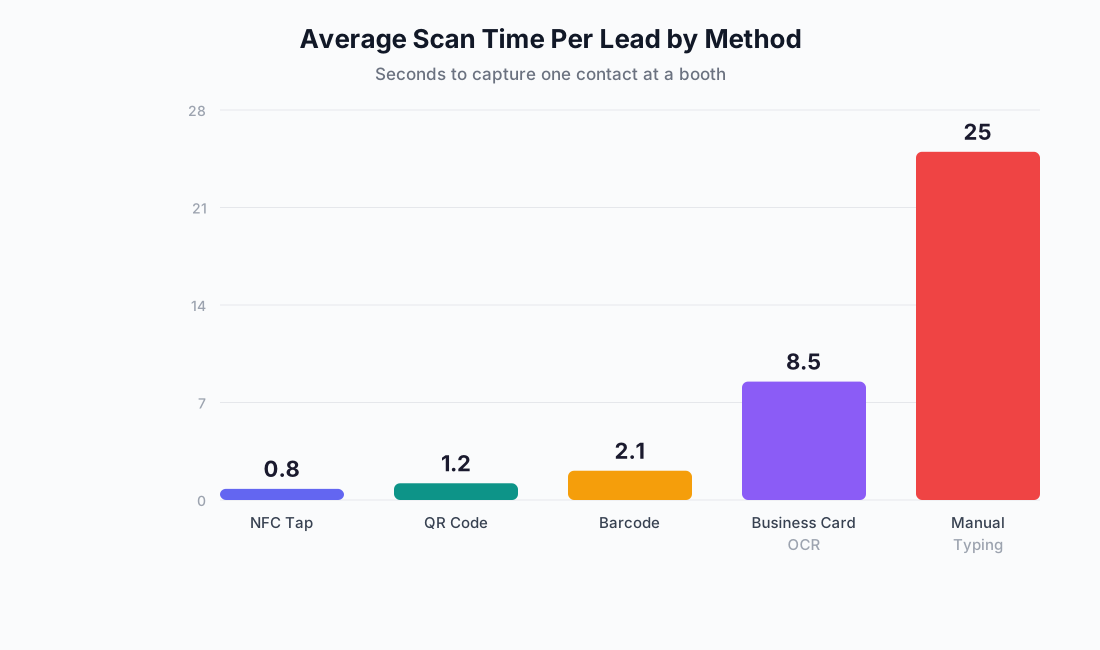
The speed numbers tell one story. The data quality tells another. Below is the full trade-off — how long each method takes compared to what you actually learn about the lead.
What to Look For in a Badge Scanning App
Format Coverage
At minimum: QR codes and barcodes. NFC support is a bonus, not a requirement. Ask every vendor the same question: "What happens when an attendee doesn't have a badge?" If they hesitate, walk away.
Offline Capability
Full offline — capture, qualify, voice notes — with automatic sync when you're back online. Don't take a sales rep's word for this. Test it yourself. Airplane mode, scan something, toggle connectivity back on, check your CRM.
Enrichment and Qualification
A raw badge scan gives you name, company, title. But your sales team needs context: What is this person interested in? Are they a decision-maker? What's their timeline? If your scanning app doesn't support custom qual forms and voice notes alongside every scan, you're collecting contacts — not leads.
CRM Sync
Direct, real-time (or near-real-time) sync to your CRM. Not a CSV export at the end of the event. Not an Excel file someone has to clean up on Monday. Check whether the app connects to your specific CRM — Salesforce and HubSpot are table stakes; Pipedrive, Zoho, and custom CRMs are harder to find.
Duplicate Detection
Picture this: same attendee visits your booth twice, gets scanned by two different reps on two different days. Your CRM should end up with one enriched lead — not two duplicates that make your sales team look sloppy. Some apps deduplicate automatically. The ones that don't will cost you hours of cleanup.
Team Visibility
Can your booth manager see how many leads each rep has scanned in real time? Can they spot someone who's slipping? A live dashboard turns lead capture from a solo sport into something you can actually manage.
How Exporb Handles Badge Scanning and Universal Capture
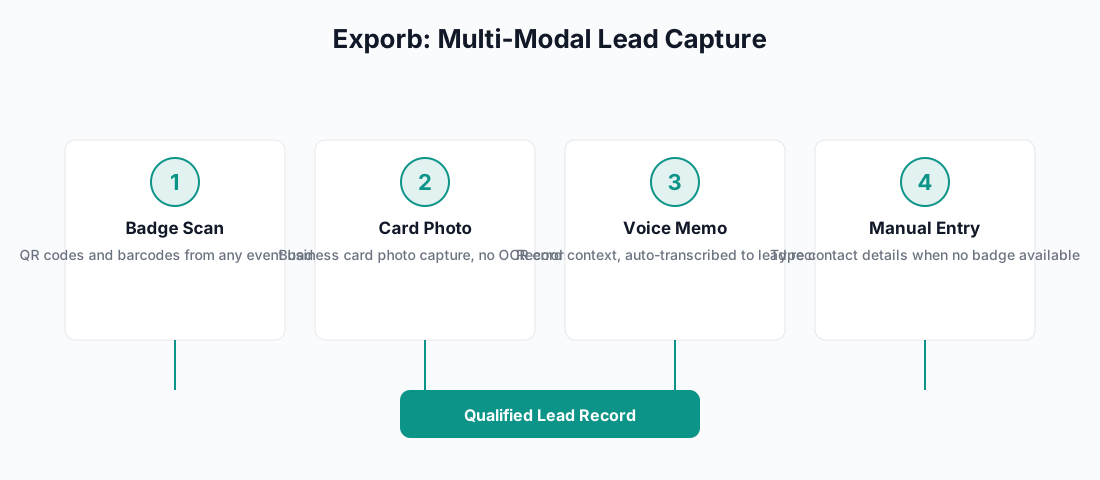
Exporb treats badge scanning as one input among several — not the whole story:
- QR code and barcode scanning — standard event badges, standard speed
- Business card photos — camera capture with manual review, no OCR hallucinations
- Voice memos with live transcription — richer qual data than any badge will ever give you
- Custom qualification forms — same fields, same workflow, your whole team aligned
- Fully offline — scan, qualify, voice note, all stored locally, sync when you reconnect
- Team coordination — live dashboards, per-rep metrics, duplicate detection built in
- One-tap CRM export — leads hit your CRM directly, not a spreadsheet
The badge gets the contact. The conversation gets the context. Exporb captures both — because a badge scan without context is just another name in a database.
FAQ
What's the difference between a badge scanner and a lead capture app?
A badge scanner reads a code and retrieves registration data. That's it. A lead capture app does that, plus qualification forms, voice notes, photos, CRM sync — the full picture. A badge scanner tells you who visited. A lead capture app tells you what happened at the booth.
Can I use my phone's camera as a badge scanner?
Absolutely — if the badges use QR codes or your app handles camera-based barcode scanning. For NFC badges, your phone needs NFC hardware (most modern phones have it). Dedicated barcode guns are faster on paper but overkill for most booth setups.
Do I need the event organizer's permission to use my own badge scanning app?
Almost never. Most events with QR or barcode badges let exhibitors use their own tools. Some organizers gate access to the attendee database — annoying, but not a dealbreaker. Capture-first mode still works: scan the badge ID now, enrich with attendee data when you're back online. Check the exhibitor manual to be sure.
What's the best badge scanning app for trade shows?
Depends entirely on how your team works. BoothIQ has a free tier, no lead caps. Mobly and Captello do solid universal capture. Zuant is built around business card OCR and offline-first. Exporb focuses on team dynamics — voice notes, guided qualification, real-time dashboards so your booth manager actually knows what's happening. The best app is whichever one your reps will actually use.
Can I export badge scan data to my CRM automatically?
Yes — if your app has native CRM integration. Look for direct Salesforce or HubSpot connections. Some sync in real time, others batch it. And for the love of god, avoid any app that only exports as "download CSV." You'll regret it by Tuesday.
How many leads can I scan per day with a badge scanning app?
Most apps don't cap you (BoothIQ's free plan even says unlimited). The real limit is your booth traffic and how many staff you've got working it. A busy 10x10 booth at a major show captures 100–300 leads a day. If you're hitting more than that, buy your reps a round — they've earned it.
Does badge scanning work if attendees don't have badges?
No — and that's exactly why you need a multi-modal tool. When an attendee shows up without a badge, your team should switch to manual entry, snap a business card photo, or record a voice memo — all in the same app, no juggling. If your tool only scans badges, you're leaving leads on the table at literally every event you attend.
Bottom Line
Badge scanning gets you contact data faster than anything else on the show floor. But a badge scan by itself is a commodity — you're pulling the same registration fields every other exhibitor at that event is pulling.
Universal lead capture is what happens when you pair badge scanning with qualification forms, voice notes, business card photos, and a direct line to your CRM — one workflow, every event, any badge format, any organizer system.
See how Exporb's multi-modal lead capture works for booth teams, or check out the sales team use case for the team coordination side.
